
Download the video
you're watching.
The extension saves what's playing. The Windows app adds YouTube, TikTok and 1,000+ sites.
Windows may warn about the new, unsigned installer. Click “More info” → “Run anyway”. Details
Clipmoth runs on your computer as a Chrome extension and a Windows app. Open this page on your PC to install it.
- 200+ users
- 14-day money-back
What Clipmoth saves
Video on the page
The extension detects the stream a page is playing (news, VOD, social embeds) and saves it as a file in one click.
HLS streams (.m3u8)
The adaptive format used by news, live and VOD sites. Clipmoth downloads every segment, including AES-128 encrypted streams, and joins them into one file.
YouTube & social platforms
The Windows app downloads from YouTube, TikTok, Instagram and 1,000+ other sites, in up to 4K/8K, with playlists and MP3.
Install, play, save
-
01
Add the extension
Install Clipmoth from the Chrome Web Store — free, no signup. It works in Chrome, and in Edge via the Chrome Web Store.
-
02
Play the video
Open the page and play the video you want. Clipmoth finds the stream.
-
03
Click to save
Click the Clipmoth icon and save the original file. No watermark, no re-encoding, nothing uploaded.
One license for both apps
One $9.99 key works in the browser extension and the Windows app. Use whichever one handles the site.
Browser extension
For Chrome (and Edge via the Chrome Web Store). It finds the video on the page you're watching, and you save it with one click. Unlimited for 30 days, then 10 a day free.
Add to Chrome →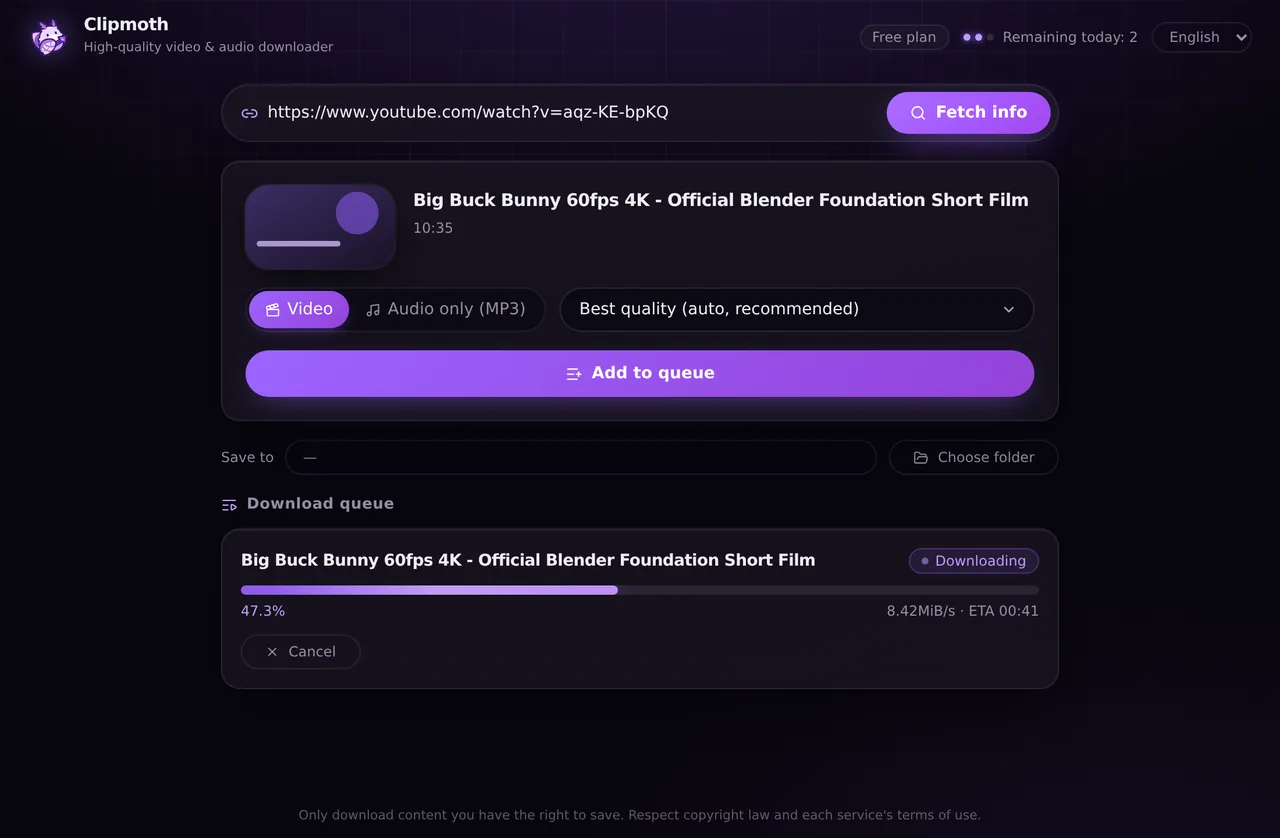
Windows desktop app
For YouTube, TikTok and 1,000+ other sites: 4K/8K, playlists and MP3 conversion.
Download for Windows →Windows may warn about the new, unsigned installer. Click “More info” → “Run anyway”. Details
About the Windows app →No single tool saves everything. DRM-protected services like Netflix or Prime Video can't be saved by any of them. Download only content you have the right to.
How Clipmoth compares
| Feature | Clipmoth | One-time purchase apps | Subscription apps | "Free" converter sites |
|---|---|---|---|---|
| Price | $9.99 once | $17–35 once | $5–10 every month | Free, but… |
| Ads & pop-ups | ✓ None | None | Rare | ✕ Many, some malicious |
| Watermark / quality loss | ✓ Original file, untouched | Usually none | Usually none | Re-encoded, capped quality |
| Privacy | ✓ On your device · no trackers | Local, but varies | Varies | ✕ Your URLs hit their servers |
| HLS / m3u8 with AES-128 | ✓ | Mostly | Sometimes | ✕ |
| One key for both apps | ✓ Extension + desktop app | ✕ Per-browser / per-device | ✕ Per-device licenses | — |
Frequently asked questions
Is this really free?
Yes. The Chrome extension is unlimited for your first 30 days — no account, no watermark — and after that you keep 10 downloads a day for free. The Windows app is free for 10 downloads a day from the start. A one-time $9.99 purchase removes the limit in both.
Do my videos get uploaded to your servers?
No. Clipmoth works on your own device — the video goes straight from the source to your download, never through our servers.
Can I download from YouTube?
The browser extension saves video that plays on the page you're on. For YouTube, TikTok and 1,000+ sites in 4K/8K — with playlists and MP3 — the Windows desktop app is the right tool.
A download failed — why?
Some services use DRM (like Netflix or Prime Video) that no tool can save, or restrict access to logged-in users. In most other cases the desktop app succeeds where a browser extension can't, because it isn't bound by browser security rules.
What is the daily limit exactly?
Extension: unlimited for the first 30 days, then 10 downloads a day. Windows app: 10 downloads a day from day one. Downloads are counted on each device only. Premium removes the limit in every Clipmoth app.
Start with the free version
The Chrome extension is free to start. $9.99, paid once, removes the limits in both apps.